

In one of my previous posts, I wrote a function to concatenate the values stored in all the cells of a specified range. That function holds good, if you have a text stored in all the cells, and you just want to club them together. It fails if you have cells containing numeric values: dates, percentages, currencies or time. In another post, I wrote a function that returns a formatted string of the value stored in a cell, by automatically fetching the cell’s Number Format.
A more robust Concatenate range function could be obtained by combining both these functions:
'===================================================================
'Function to Concatenate the values stored in every Cell of a Range
'and retain Formats
'Author     : Ejaz Ahmed
'Date       : 18 November 2013
'Website    : http://strugglingtoexcel.wordpress.com/
'===================================================================
Function ConcRangeWithFormats(ByRef WhichRange As Range, _
            Optional ByVal Seperator As String = vbNullString, _
            Optional ByVal ForceVolatile = True) As Variant

'to referesh formats when changed immediately. Would force excel
'to recalculate these cells unconditionally
Application.Volatile

'Begin by setting the ConcRange to a blank string
ConcRangeWithFormats = vbNullString

'Declare a Range object to use in the For Each Loop
Dim rngCell As Range

'For Each loop concatenates all the cells in the range
For Each rngCell In WhichRange
    If ConcRangeWithFormats = vbNullString Then
        If Not rngCell.Value = vbNullString Then
            ConcRangeWithFormats = AutoText(rngCell, ForceVolatile)
        End If
    Else
        If Not rngCell.Value = vbNullString Then
            ConcRangeWithFormats = ConcRangeWithFormats & _
                        Seperator & AutoText(rngCell, ForceVolatile)
        End If
    End If
Next rngCell

End Function
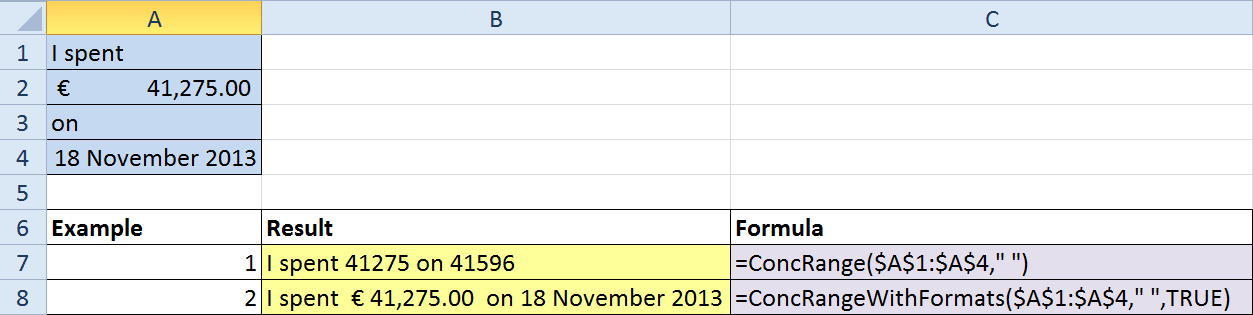
Below is screenshot of a spreadsheet illustrating the use of these Functions:


Reblogged this on Sutoprise Avenue, A SutoCom Source.